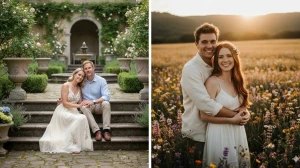
Best 10 Hunyuan Image 3.0 AI Photo Editing Prompts for Couples to Create Instagram-Viral Couple Portraits
Discover the top 10 Hunyuan Image 3.0 AI photo editing prompts for couples to craft stunning, Instagram-worthy couple portraits. Create viral, dreamy images with ease using these AI-powered prompts.
by James
Published Jan 09, 2026 | Updated Jan 09, 2026 | 📖 7 min read
Article continues below advertisement
Quick Summary
✅ 10 romantic AI prompts for couple portraits that go viral
✅ Works with Hunyuan Image 3.0 - China's most advanced AI
✅ Create cinematic couple photos in Paris, cafés, meadows & more
✅ 100% free to use - keeps real faces & natural skin texture
✅ Perfect for Instagram Reels, Stories, DPs, and anniversary posts
✅ 10 romantic AI prompts for couple portraits that go viral
✅ Works with Hunyuan Image 3.0 - China's most advanced AI
✅ Create cinematic couple photos in Paris, cafés, meadows & more
✅ 100% free to use - keeps real faces & natural skin texture
✅ Perfect for Instagram Reels, Stories, DPs, and anniversary posts
Best 10 Hunyuan Image 3.0 AI Photo Editing Prompts for Couples to Create Instagram-Viral Couple Portraits
Hunyuan Image 3.0 is revolutionizing couple photography no expensive photoshoots, no travel to exotic locations, and no professional editing skills required.
Through the power of advanced AI photo editing, any couple can now transform ordinary selfies into stunning, Instagram-viral portraits that look like they were captured by a professional photographer in the most romantic destinations around the world.
Whether you're celebrating an anniversary, building your couple aesthetic on Instagram, creating content for Reels covers, or simply want matching DPs that radiate romance and connection, Hunyuan Image 3.0's intelligent editing capabilities deliver exceptional realism, cinematic lighting, and emotion-heavy compositions.
In this article, we'll explore 10 expertly designed prompts that can instantly transform your couple selfies into viral-worthy portraits. From golden-hour Paris streets and rain-kissed café windows to meadow sunsets and cozy fireplace moments—every image gains that cinematic, film-still quality that stops scrolling and captures hearts.
If you're interested in exploring more AI-powered creative tools for romantic content, check out our comprehensive guide on top AI tools transforming couple photography in 2025.
Prompt 1: Paris Sunset Lovers Glow
Use This:
"Edit this into a warm, cinematic portrait of the couple standing in a sun-drenched Paris street at golden hour. Soft amber light should wash over their faces, creating glowing skin tones and gentle shadows. The background should be softly blurred, with hints of pastel architecture fading into warm tones. Enhance natural expressions—a quiet, intimate look—and add creamy cinematic bokeh around them. Colors should feel warm, rich, and emotional, like a film-still romance that instantly stops scrolling."
Best for: Couples reels, romantic feeds
Prompt 2: Rain-Kissed Café Love
Use This:
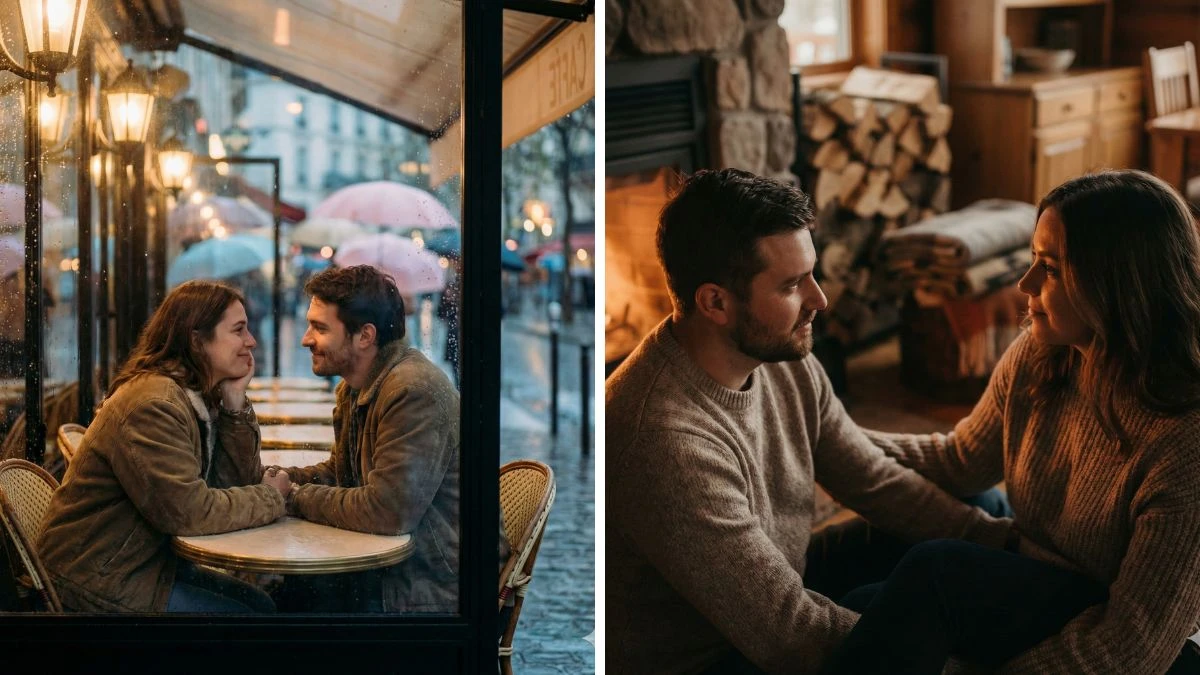
"Transform this into an emotional, rainy outdoor café portrait. Soft rain droplets on the window behind them, warm café lighting reflecting on their faces, and gentle pastel bokeh in the background. Emphasize natural eye contact and soft smiles. Warm color grading with moody blues and amber highlights creates depth. This should feel like a real-life romantic Paris film moment—cozy, cinematic, and achingly beautiful."
Best for: Romantic stories, emotional reels
Prompt 3: Meadow Sunset Embrace
Use This:
"Turn this into a cinematic meadow portrait at sunset. Golden light grazing their profiles, gentle breeze in hair, soft wildflowers framing the bottom of the frame. Colors should feel rich and natural—warm golds, muted greens, subtle pastel sky. Light should feel soft and diffused, creating a romantic atmosphere and honest connection—like summer love captured in film."
Best for: Nature aesthetic couples
Prompt 4: City Night Lights Portrait
Use This:
"Edit this into a dynamic nighttime city portrait with neon reflections and soft street light glows. Color contrast between warm orange highlights and cool blue shadows adds drama, while subtle reflections from neon signs play on their faces. Keep skin tones warm and alive, eyes bright. The background should be artistic bokeh with city colors, creating an urban love story vibe that feels cinematic and trend-ready."
Best for: Urban reels & nightlife feeds
Prompt 5: Cozy Fireplace Couple Frame
Use This:
"Turn this into a warm, cinematic indoor portrait by a fireplace. Amber light flickers across their faces, creating soft highlights and cozy shadows. Background elements like wood textures and warm blankets dissolve into rich, comforting bokeh. Color grading should elevate warm tones without oversaturating—soft glows on skin, muted deep shadows. This feels like intimate indoor storytelling trending on Instagram right now."
Best for: Cozy reels, winter couples
Prompt 6: One Sitting, One Standing (Power Balance)
Use This:
"Edit the couple so one partner is seated casually (chair, step, bench) while the other stands beside them, slightly leaning in. The standing partner looks confident; the seated one looks calm and composed. Lighting is soft and directional, highlighting contrast in posture. Color grading warm but restrained, giving a fashion-editorial look that feels intentional and stylish."
Best for: Fashion-forward couple feeds
Prompt 7: Back-to-Back With Different Focus
Use This:
"Create a cinematic portrait with the couple standing back-to-back. One looks directly at the camera, the other looks away into the distance. No smiles. Clean composition, soft natural light, subtle contrast. The pose communicates independence + connection, a popular Instagram trend for modern couples who don't want 'cute' vibes."
Best for: Modern aesthetic pages
Image Credit: Hunyuan Image 3.0
Prompt 8: Over-the-Shoulder Glance (Reel Cover Pose)
Use This:
"Edit the couple so one partner is closer to the camera in focus, while the other is slightly behind, blurred, looking over their shoulder toward the camera. This creates depth and hierarchy in the frame. Warm tones on skin, muted background, shallow depth of field. This pose is extremely effective as a Reels thumbnail."
Best for: Reels covers, viral thumbnails
Prompt 9: Candid Laugh, No Camera Awareness
Use This:
"Transform the image into a candid-style moment where both partners are laughing or reacting to each other, clearly not aware of the camera. Faces turned toward each other, imperfect posture, natural motion. Light should feel real and soft, colors slightly warm. This looks like a real memory—not a photoshoot—which is exactly what trends on Instagram."
Best for: Lifestyle & memory-style posts
Prompt 10: Face-to-Face, Foreheads Almost Touching
Use This:
"Edit the couple standing extremely close, faces almost touching, but not kissing. Eyes closed or half-closed, breathing space visible. Soft backlight creates a glow around hair and facial edges. Colors muted and warm. This pose is intimate but elegant—a high-engagement Instagram aesthetic without being cheesy."
Best for: Soft romantic portraits
How to Create Instagram-Viral Couple Portraits with Hunyuan Image 3.0
According to Tencent's official Hunyuan documentation, advanced prompt engineering techniques can dramatically improve the quality and emotional impact of AI-generated couple portraits. Follow these steps to create stunning Instagram-viral couple images:
1. Launch Hunyuan Image 3.0
- Open Hunyuan Image 3.0's photo editing page through the web or mobile app, and sign in to your account.
2. Upload a Clear Couple Selfie
- Select a high-quality photo where both faces are visible, well-lit, and not heavily filtered. Ensure sharp facial details and natural expressions for best results.
3. Enter a Couple Portrait Prompt
- In the prompt field, paste or type one of the 10 prompts above. For example:
- "Ultra-realistic Paris sunset couple portrait, warm golden hour lighting, cinematic bokeh, natural skin texture, 4K Instagram-viral look."
4. Add Control Instructions
- Enhance your prompt with specifics such as:
- Face accuracy: "keep both faces exactly the same from reference photo"
- Lighting: "soft directional light, warm amber tones"
- Mood: "romantic, cinematic, emotional connection"
- Quality: "ultra-realistic 4K, natural skin texture"
5. Set Style Preferences
- Choose your desired options for:
- Resolution: 4K (recommended for Instagram)
- Color grading: warm/cool tones, cinematic look
- Background: Paris street, café, meadow, city lights
- Pose style: intimate, editorial, candid, modern
6. Generate and Fine-Tune
- Click Generate/Create to produce your image. Review the result, then adjust lighting, pose, or background details by changing 2-3 words in the prompt and regenerating.
7. Save and Share
- Download the final 4K portrait and crop it to fit your platform:
- Instagram Feed: 4:5 ratio
- Stories/Reels: 9:16 ratio
- Matching couple DPs: 1:1 square
- Share your Instagram-viral couple portrait and watch the engagement roll in.
Related Articles
Disclaimer : The above information is for general informational purposes only. All information on the Site is provided in good faith, however we make no representation or warranty of any kind, express or implied, regarding the accuracy, adequacy, validity, reliability, availability or completeness of any information on the Site.